SIMULATOR SHOPPING? CONTACT US FOR FREE CONSULTATION
TOP NOTCH VTRACK SIM BUNDLE
SKU 7337_sku
C$7 185.00
Order Now
was C$7 635.00 Save 6%
SWING EZ - AI SWING TRAINER (RH ONLY)
Please choose
COMPUTER MONITOR
Please choose
ENCLOSURE
Please choose
PROJECTOR
Please choose
HITTING SURFACE
Please choose
LANDING TURF
Please choose
In stock
TOP NOTCH VTRACK SIM BUNDLE
Product Details
BUILD YOUR V-TRACK GOLF SIMULATOR
A Complete Overhead Simulator Package. Built Your Way.
Take your indoor golf experience to the next level with the V-Track Simulator Bundle from Top Notch Golf. This package gives you the foundation for an incredible home or commercial golf simulator, with the flexibility to customize every component to suit your space, playing preferences, and budget.
WHAT'S INCLUDED IN THE SHOWN PACKAGE PRICE
Your V-Track Simulator Bundle includes:
- V-Track Launch Monitor – Advanced overhead launch monitor technology for a clean, unobstructed hitting environment.
- V-Track Protector – Added protection for your launch monitor installation.
- GSPro Software – Enjoy an incredible virtual golf experience with access to a wide selection of courses and realistic gameplay.
- RadTee Anchor System - 5 Tee System - Never Look For Your Tee Again
The V-Track, V-Track Protector, and GSPro are all included in the advertised starting price. Everything else is customizable through the options below.
TEAM TNG RECOMMENDS
Best Value Without Sacrificing Performance
If we were building a simulator for ourselves and wanted the best combination of performance, space, and value, this is the configuration we'd choose.
1. V-Track + Protector + GSPro
The foundation of your simulator. Everything you need to get started with an exceptional overhead launch monitor experience is already included in your package price.
2. Sportscreen Parlour 13H
Our recommended enclosure.
The Parlour 13H gives you just a little more room than you may think you need. That extra space makes a difference when swinging freely, whether you're right-handed or left-handed.
We would rather see you have a little extra room than wish you had more after your simulator is installed.
3. BenQ AH700ST Projector
Our Best-Value Projector Recommendation
- Premium 4,000-lumen golf projector.
- Excellent brightness for indoor simulator environments.
- Short-throw design for convenient installation.
- Excellent balance of image quality and overall value.
- FREE projector mount included with this package.
A great choice for golfers who want premium performance without feeling like they've sacrificed anything to save money.
4. EZ Tee Hybrid Hitting Strip
For the V-Track, we love a dedicated hitting strip.
It gives you a properly sized hitting area, helps you utilize the intended hitting zone, and makes future replacement much more affordable than replacing a full stance mat.
If you prefer a full stance mat, we'd recommend the 4' × 9' option. This allows both righties and lefties to comfortably position themselves in the middle of the mat, even with a driver in hand.
5. Landing Turf – Save Here First!
If you're trying to keep your build within budget, this is where we'd look to save some money first.
A simple foam or yoga mat landing area with surrounding carpet can work perfectly well.
If you want the premium look and feel, however, our recommendation is the NP45 Black Putting Turf in the 13' × 15' configuration paired with the Camo Ez Tee Hybrid+ Hitting Strip for the Sportscreen Parlour 13H. This is the perfect width for your Sportscreen and the darker green finish on the Camo EZTee Hybrid+ paired with the black turf looks clean and premium
It's certainly not necessary, but it gives your simulator that clean, finished look while doubling as a tour quality putting surface.
CUSTOMIZE YOUR SIMULATOR
1. CHOOSE YOUR ENCLOSURE
Your enclosure is the foundation of your simulator space. It provides the structure for your impact screen, protects your surroundings, and helps create that authentic indoor golf experience.
Choose from our available enclosure options:
- SimSpace – A versatile simulator enclosure solution.
- Sportscreen Parlour – A premium enclosure option with an excellent balance of space and performance.
- Sportscreen Vanish Lite – A streamlined enclosure option.
- Sportscreen Vanish – A premium enclosure solution for a clean, integrated simulator environment.
Consider your available room dimensions, ceiling height, and whether you regularly play right-handed, left-handed, or both.
TEAM TNG TIP: Don't underestimate the importance of extra room. Having sufficient width and depth makes a big difference when swinging freely, especially when accommodating both right- and left-handed golfers.
2. SOFTWARE UPGRADES
Swing EZ
Take your practice sessions further with Swing EZ, an additional software option for V-Track users looking to enhance their training and practice experience.
Upgrade your package with Swing EZ and take advantage of additional practice tools alongside your simulator experience. Use Advanced AI Software to Analyze Your Swing & Recommend Changes To Make Instant Game Changing Improvements. This option is for right hand golfers only at this time
Swing EZ is an optional upgrade and is not included in the base package. 1 time lifetime purchase
3. TOUCHSCREEN MONITOR UPGRADE
43" 4K Touchscreen Monitor
Regular Price: $1,999.99 | Package Price: $1,299.99
Add a 43-inch 4K touchscreen monitor to your simulator setup.
This is an excellent addition for golfers who want convenient touchscreen access to their simulator software and practice features.
Especially recommended when adding Swing EZ, providing an easy-to-use interactive display for your practice sessions with enhanced visuals of the changes you need to make to improve your game.
4. CHOOSE YOUR HITTING SURFACE
EZ Tee Hybrid & Premium Stance Mats
Your hitting surface is one of the most important components of your simulator. It directly affects your comfort, practice experience, and ability to make consistent contact.
We offer EZ Tee Hybrid hitting surfaces in different configurations, from a dedicated hitting strip to larger 5' × 10' stance mats.
Hitting Strip
A dedicated hitting strip is an excellent option for golfers who want a quality hitting surface without purchasing a full stance mat.
The V-Track hitting strip is sized to give you ample hitting area while allowing you to utilize the entire surface. Keeping your hitting area properly positioned also helps minimize misreads caused by ball placement outside the intended hitting zone.
Another advantage is replacement cost. If your hitting surface eventually wears out, replacing a dedicated strip is much more economical than replacing an entire stance mat.
Full Stance Mats
For golfers who prefer a larger hitting area, we offer full-size stance mat options.
Our recommendation for most V-Track installations is a 4' × 9' stance mat.
This provides plenty of room for both right- and left-handed golfers to set up comfortably in the middle of the mat, including when hitting driver.
We also offer larger 5' × 10' options for those who want additional space.
5. ADD LANDING TURF
Complete the Look. Improve Your Indoor Golf Experience.
Landing turf helps create a finished, golf-course-inspired appearance while helping manage ball bounce-back after impact with your screen.
It also provides a premium putting surface, allowing you to practice your short game right inside your simulator.
All landing turf selections will be sized to match the depth and width of your selected enclosure.
Where Should You Spend Your Money?
TEAM TNG TIP: If you're looking to save money on your simulator build, landing turf and surrounding flooring are the first places we'd recommend considering.
A premium putting surface certainly looks fantastic, but you don't need an expensive flooring system to enjoy a great simulator.
A simple combination of foam or yoga mats for the landing area and carpet for the surrounding floor can provide a functional alternative.
Our Premium Recommendation: NP45 Black Putting Turf
For golfers looking for that premium finished appearance, we recommend NP45 Black Putting Turf.
For the Sportscreen Parlour 13H setup, we recommend the 13' × 15' configuration (195 square feet), subject to your final room and installation measurements.
This creates a clean, professional-looking simulator floor with a dedicated putting surface that complements your enclosure.
V-TRACK INSTALLATION GUIDE
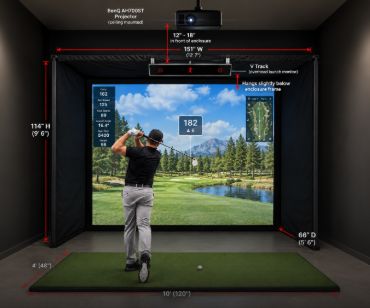
Here's how we'd approach a typical V-Track and Sportscreen Parlour 13H installation.
These are recommended starting measurements for a room with approximately 9–10 ft ceilings. Final placement should always be confirmed against your exact room dimensions and selected equipment.
Enclosure Placement
- Position your enclosure approximately 1 ft away from the back wall.
- This provides space behind the enclosure and impact screen.
V-Track Placement
- Mount your V-Track approximately 6.6 ft from the impact screen.
- Recommended ceiling height: approximately 9–10 ft.
- Confirm the manufacturer's mounting and hitting-zone requirements before final installation.
Projector Placement
- General recommended mounting distance: 9–12 ft from the impact screen.
- For our recommended AH700ST configuration, plan around 10–12 ft, subject to the required image size and projector throw calculations.
- Mounting height will depend on your ceiling and projector installation requirements.
PRO TIP: Don't Forget Your V-Track Mounting Bracket!
If you're purchasing a Sportscreen Parlour 13H, we recommend adding the dedicated launch monitor mounting bracket.
It helps position your V-Track in the intended location for the enclosure.
One important installation tip: Once your V-Track is mounted, take your final measurements for your hitting area before purchasing or positioning your hitting mat. This helps ensure your hitting strip is properly aligned with your launch monitor.
SELECT YOUR PROJECTOR & COMPUTER REQUIREMENTS
BenQ Golf Projectors – 1080p HD & 4K Options
Your projector is responsible for bringing your virtual golf course to life. We offer a selection of BenQ golf projectors, with both 1080p HD and 4K options to suit different budgets and performance requirements.
What's the difference between 1080p HD and 4K?
1080p HD
- Resolution of 1920 × 1080 pixels.
- Excellent image quality for most home simulator environments.
- Less demanding on your computer's graphics card.
- A great balance of performance, image quality, and overall value.
4K Ultra HD
- Resolution of 3840 × 2160 pixels.
- Four times the pixel count of 1080p.
- Sharper details, clearer text, and enhanced image definition.
- Ideal for golfers looking for a premium, high-resolution simulator experience.
What computer do you need?
Your computer plays an important role in determining the image quality you can achieve.
For 1080p HD V TRACK & GS PRO: Recommended PC Specs for 1080p HD (60fps)
- Operating System. Windows 10 or Windows 11 (64-bit).
- Processor (CPU). Intel Core i5 or i7 (10th generation or newer) or equivalent AMD Ryzen 5+ (minimum 3.0 GHz dual-core required for basic tracking, though multi-core is needed for HD rendering).
- Graphics Card (GPU). Dedicated GPU with at least 4GB VRAM. An NVIDIA GTX 1070 is the baseline for smooth 1080p HD simulation, while an RTX 3070 or newer is recommended for high graphical settings or 4K scaling.
- Memory (RAM). 16GB RAM (8GB is the bare minimum, but 16GB prevents stuttering during HD course loading and impact replay).
- Storage. Solid State Drive (SSD) with at least 100GB to 200GB of free space.
- Display Output. 1080p (1920x1080) resolution at a minimum 60Hz / 60fps
FOR 1080P FOR V TRACK WITH GSPRO & SWINGEZ
Recommended PC Specs (Laon SwingCraft — SwingEZ)
- OS: Windows 11 (64-bit)
- CPU: Intel Core Ultra 5 245K / 245KF or AMD Ryzen 7 7700X / 9700X
- GPU: NVIDIA GeForce RTX 5070 recommended; NVIDIA GeForce RTX 4060 Ti minimum
- RAM: 32GB DDR5 or higher
- Storage: SSD with at least 30GB free disk space (VTrack alone specifies 100GB+ recommended overall)
- USB Ports: At least 2x USB 3.0 Gen1 (5Gbps) or higher for the SwingEZ cameras
- Network (for VTrack): Gigabit Ethernet interface (Intel Pro/1000-class chipset or EXPI9301CT NIC with Jumbo Packet and 2048
For 4K VTRACK & GS PRO ONLY: Recommended PC Specifications for 4K
| Component | Recommended Spec for 4K | Minimum Base Spec (1080p) |
|---|---|---|
| Graphics Card (GPU) | NVIDIA RTX 5070 / RTX 5070 Ti (or RTX 4070 Ti / 4080) | NVIDIA RTX 3070 (or GTX 1070 for native range only) |
| Processor (CPU) | Intel Core i5 / i7 (10th Gen+) or AMD Ryzen 5 / 7 (3.0 GHz+) | Dual-core 3.0 GHz+ |
| Memory (RAM) | 32 GB (DDR5 recommended if adding SwingEZ) | 16 GB |
| Storage | 100 GB+ free SSD space | 20 GB – 40 GB free space |
| Operating System | Windows 10 or Windows 11 (64-bit) | Windows 10 (64-bit) |
| Network Adapter (NIC) | Dedicated Gigabit Ethernet with Intel PRO/1000 chipset (e.g., Intel EXPI9301CT) | Gigabit Ethernet port |
FOR 4K VTRACK, GS PRO & SWING EZ
Recommended PC & 4K Hardware Specs
- Operating System: Windows 11 (64-bit) recommended for SwingEZ (Windows 10 64-bit listed as baseline for VTrack).
- CPU: Intel Core Ultra 5 245K / 245KF or AMD Ryzen 7 7700X / 9700X (Laon SwingCraft SwingEZ spec); VTrack alone lists a dual-core 3.0GHz+ or Intel Core i5 / AMD Ryzen minimum.
- GPU: NVIDIA GeForce RTX 5070 Ti or higher is recommended for 4K graphics (Laon SwingCraft lists RTX 5070 recommended / RTX 4060 Ti minimum for SwingEZ, while third-party simulator software like GSPro or E6 may also influence 4K frame rates).
- RAM: 32GB DDR5 or higher (Laon SwingCraft SwingEZ spec); VTrack minimum is 16GB.
- Storage: SSD with at least 100GB+ available free space to cover VTrack (100GB+) and SwingEZ (30GB SSD space required).
- USB Ports: At least 2x USB 3.0 Gen1 (5Gbps) or higher ports for SwingEZ cameras.
- Network (for VTrack): Gigabit Ethernet interface, ideally with an Intel Pro/1000-class chipset, Jumbo Packet support, and Receive Descriptors of 2048 or higher (such as an Intel EXPI9301CT NIC).
- Displays: SwingEZ requires a dual-screen setup (one display for range/course view, one for swing videos/AI coaching/data); ensure your primary display or projector supports 4K resolution and at least 60fps.
Space & Mounting Notes
- VTrack Mounting: Ceiling-mounted roughly 8.5–10 feet (minimum 106 inches) above the hitting area and 36–42 inches in front of the hitting spot, with recommended clearance around your swing path and impact screen. [1, 2]
- SwingEZ Cameras & Lighting: Uses two cameras (front-on and down-the-line) with wide-angle/3.5mm lenses and requires strong ambient lighting to minimize motion blur on high-speed clubheads. [1, 2]
Remember, purchasing a 4K projector alone does not guarantee a 4K image. Your computer, graphics card, display output, and software settings must all support the resolution you want to run.
Our team can help match your computer and projector so you get the best possible experience without overspending.
Projector Installation
All BenQ projectors included in this package come with a FREE projector mount!
As a general recommendation, our projectors should be mounted approximately 9–12 feet from your impact screen, depending on the projector model, image size, enclosure dimensions, and mounting height.
We offer multiple BenQ projector options listed on our website. If you need help choosing the right model, require a different BenQ projector, or have an unusual room configuration, please reach out to our team before purchasing.
READY TO BUILD YOUR SIMULATOR?
Not sure which options are right for your room? Need help selecting a projector, computer, enclosure, or hitting surface?
That's exactly what we're here for.
At Top Notch Golf, we specialize in helping golfers build the right simulator setup without overspending on components they don't need.
Whether you're building a simple home simulator or a premium golf room, our team can help you put all the pieces together.
Have questions or don't see the product you're looking for?
Contact our team directly:
Phone: 902-620-0824
Website: www.topnotchgolf.ca
Reach out by phone or through our website contact page. We'd be happy to help you build your perfect simulator!
TOP NOTCH GOLF – BUILD IT RIGHT. PLAY MORE GOLF.
Display prices in:CAD