
Golf Simulator Buying Guide for Canadians
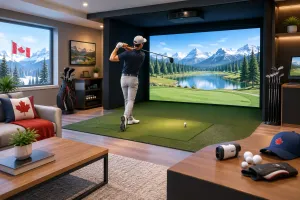
A golf simulator can turn a spare room, garage, basement, or commercial bay into a serious practice space when the course is closed and the range is snow-covered. But the right system is not simply the most expensive launch monitor on the market. It is the combination of accurate ball data, enough room to swing confidently, a screen and enclosure built for repeated impact, and software you will actually use.
Start With How You Will Use the Golf Simulator
A player trying to tighten dispersion and improve strike quality needs dependable club and ball data first. Carry distance, ball speed, launch angle, spin rate, face-to-path relationship, and impact location can turn a winter practice session into a productive training plan. In that case, a premium camera-based launch monitor such as Foresight GCQuad or a radar-based TrackMan setup may be the right fit.
Measure the Room Before Choosing a Launch Monitor
Room dimensions will narrow the field faster than almost any feature comparison. Start with ceiling height. Most golfers need at least 9 feet to make a comfortable full swing, while 10 feet or more gives taller players and faster swingers better clearance. Do not assume a swing is safe because it clears the ceiling by a few centimetres. A driver swing changes with different players, shoes, fatigue, and confidence.
A Practical Space Checklist
The room should allow for a natural swing, a safe gap between the player and screen, and enough clearance behind the screen for impact absorption. You will also need a stable hitting surface, access to power, reliable internet for software updates, and controlled lighting if you plan to use a projector.
Choose Accuracy That Matches Your Goals
Not every golfer needs the same level of measurement. Entry-level personal launch monitors can provide useful carry-distance and ball-flight feedback for practice. They can be a strong starting point for golfers who want a portable unit for the range and an accessible indoor setup at home.
Budget for the Complete Simulator Build
A launch monitor price is only one line in the project. A usable golf simulator also requires a hitting mat, impact screen or net, enclosure or frame, and software. For a projected setup, add a projector, mounting hardware, computer or gaming-ready device, cables, and potentially a projector enclosure.
Software Costs Deserve a Closer Look
Simulator software can involve annual subscriptions, course packages, online play features, or different licensing tiers. Confirm what is included with the launch monitor, what requires a recurring payment, and which device runs the software. A powerful gaming computer may be required for the best graphics and smooth performance.
Plan the Build Around Real Golfers
A permanent build should be designed for the people who will hit balls most often. If both right- and left-handed golfers will use it, centre-hitting capability is a major advantage. If the room doubles as a home theatre or lounge, look for an enclosure and screen arrangement that keeps the space clean when golf is not on the schedule.
Make Practice Specific, Not Random
What you’ll find here
Posts about what we do and how to make the most of it. 1. Stories from the life of the store. Real moments from our everyday work, from busy days to small wins, that show what running the business actually looks like. 2. Tips and tricks of the trade. Practical advice based on our experience, whether it’s how to choose the right option, avoid common mistakes, or get more value from what we offer. 3. Event announcements and updates. Information about upcoming events or reports of local activities we’re involved in. This space is meant to be a helpful extension of our business — something you can check in on, learn from, and feel part of, even when you’re not there in person.